How to Conduct a Prior Art Search (Step by Step)

How to Conduct a Prior Art Search: A 7-Step Method Using Free Databases
A prior art search is the cheapest way to avoid the most expensive mistake in patent practice: spending $10,000 to $15,000 on a non-provisional patent application for an invention that's already been disclosed somewhere in the world.
Most inventors skip this step. It feels unrewarding — you're looking for reasons your idea won't work. But four to eight hours of focused searching before you file can save you a year of attorney drafting time and the legal fees that come with it. And if your prior art search is thorough enough, it doubles as the foundation of a freedom-to-operate analysis that an investor or partner will eventually ask for.
This guide walks through what prior art legally is, the seven free databases that should be in every search, a step-by-step search method you can complete in a focused afternoon, and how to know when results should kill your filing versus when you can design around them.
Key Takeaways
- Prior art under 35 U.S.C. § 102 includes patents from any country in any language, academic papers, product disclosures, public uses, and conference talks predating your filing.
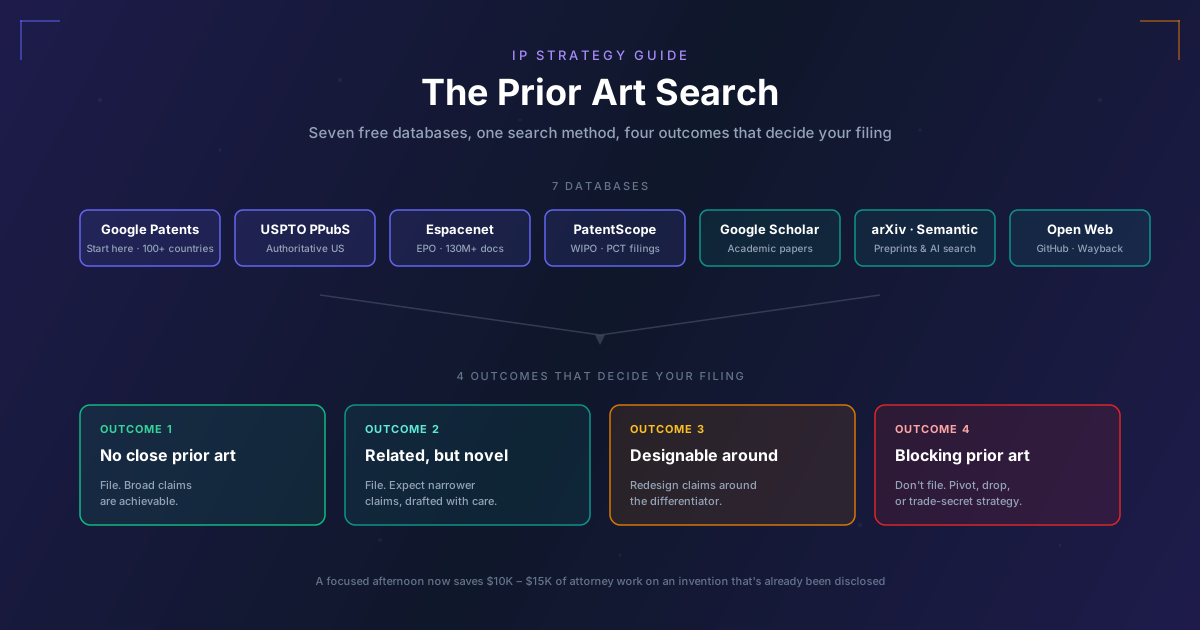
- Seven free databases cover ~80% of what professional searchers find: Google Patents, USPTO Patent Public Search, Espacenet, WIPO PatentScope, Google Scholar, Semantic Scholar/arXiv, and targeted open-web searches.
- The 7-step method (decompose → CPC codes → keyword search → classification search → citation mining → non-patent literature → document) takes 4–8 focused hours for most inventions.
- Searching by CPC classification code finds patents regardless of terminology — this is the technique professional searchers rely on most.
- The most valuable outcome is sometimes "don't file" — finding blocking prior art before spending $10K–$15K on a non-provisional is the highest-leverage use of search time.
If you're sitting on an invention disclosure or about to engage a patent attorney, this is the work to do first.
What Is Prior Art Under U.S. Patent Law?
In U.S. patent law, "prior art" is anything that was publicly available before the effective filing date of your patent application. The legal definition lives in 35 U.S.C. § 102, and it's broader than most inventors expect.
Prior art includes:
- Issued patents from any country, in any language
- Published patent applications (most non-provisionals publish at 18 months)
- Academic papers, journal articles, and conference proceedings
- Textbooks, dissertations, and technical reports
- Product manuals, datasheets, and marketing materials
- Trade show demos and conference talks
- Public websites, including archived versions
- Public uses or sales of the invention anywhere in the world
Two things matter about this list. First, it's global. A patent issued in 1987 in Japan and never translated is still prior art against you today. Second, it's not just patents. A 2003 academic paper that disclosed your exact mechanism counts even if no patent ever issued on it.
What is not prior art (under the U.S. 1-year grace period in 35 U.S.C. § 102(b)):
- Your own public disclosures made within 12 months before your filing date
- Disclosures derived from you (someone publishing your work without your permission)
The grace period preserves U.S. patentability but not international. In most countries outside the U.S., any public disclosure before the filing date (including the inventor's own) destroys novelty. This is why we recommend filing a provisional before any public disclosure if international rights matter. (See our provisional patent application guide for the timing decision.)
Which 7 Databases Should Every Prior Art Search Include?
You can pay a professional searcher $1,500 to $5,000 to do this work, and for complex inventions you probably should. But for most inventions, a determined inventor with a methodical approach and these seven free tools can find 80% of what a professional searcher would find.
1. Google Patents — Start Here
The single best starting database. Google Patents indexes the USPTO, EPO, WIPO, and patent offices of 100+ other countries. It auto-translates non-English patents. Its search is forgiving, its result ranking is intelligent, and it cross-links related documents.
Use it for the first pass on any search. Spend 60-90 minutes here.
2. USPTO Patent Search — The Authoritative U.S. Source
The USPTO Patent Public Search system (which replaced PatFT and AppFT in 2022) is the authoritative source for U.S. patents and published applications. Its search is more powerful than Google Patents (it supports field-restricted searches, classification codes, and complex Boolean queries) but its interface has a learning curve.
Use it for thorough U.S. searches after you've identified relevant CPC classes from Google Patents.
3. Espacenet — The European Database
Espacenet, run by the European Patent Office, indexes 130+ million patent documents from 100+ countries. Its non-English coverage is better than Google Patents in some technical fields, particularly chemistry, mechanical, and Japanese/Korean documents.
Use it for international coverage and as a cross-check on Google Patents.
4. WIPO PatentScope — International (PCT) Coverage
patentscope.wipo.int
PatentScope indexes published PCT (Patent Cooperation Treaty) international applications, plus the patent collections of 80+ national offices. It is the best source for finding recently filed international applications that may not be in Google Patents yet.
Use it specifically to look for PCT applications filed in the last 2-3 years.
5. Google Scholar — Academic Prior Art
scholar.google.com
Patent law treats academic papers as prior art equivalently to patents. A paper published in 2002 that disclosed your invention is just as fatal as a 2002 patent.
Use Google Scholar to search for the underlying scientific or technical concepts in your invention, especially for biotech, software, materials science, and any field where academic publication leads industry by years.
6. Semantic Scholar / arXiv — Deep Technical Literature
semanticscholar.org and arxiv.org
Semantic Scholar's AI-powered semantic search can surface relevant papers that keyword searches miss. arXiv is the preprint server for physics, computer science, math, and biology, and is increasingly the first place new technical concepts are disclosed.
Use these for any invention where the cutting edge moves through papers before patents.
7. The Open Web (with Care)
The Wayback Machine (web.archive.org), product datasheets, conference proceedings, YouTube technical demos, and Reddit/Hacker News discussions all count as prior art if they pre-date your filing.
Use targeted Google searches with date restrictions to surface these. They're particularly important for software inventions, where prior art often lives in GitHub repos, Stack Overflow answers, and product release notes rather than patents.
How Do You Run a Prior Art Search Step-by-Step?
The method below is what professional patent searchers use, compressed into something an inventor can complete in 4-8 focused hours. Work through the steps in order.
Step 1: Decompose the Invention Into Searchable Concepts
Before you touch a database, write down the invention in three forms:
- The problem. What does it solve? Write 2-3 sentences.
- The novel mechanism. What's actually new? The 1-2 elements that make it different from existing solutions.
- The keywords. For each novel mechanism, list 5-10 keywords and synonyms a person of skill in the art might use.
Most failed searches fail at this step because the inventor searched for their own terminology and missed the prior art that used different terminology. If you call your technique "membrane-assisted separation" and the existing literature calls it "ultrafiltration crossflow," you'll find nothing.
Step 2: Identify CPC Classification Codes
The Cooperative Patent Classification (CPC) system organizes all patents into hierarchical technical categories. Searching by CPC class is more reliable than searching by keyword because it captures patents regardless of the terminology they use.
To find your CPC class:
- Run a keyword search in Google Patents
- Look at the CPC codes (right sidebar) on the 3-5 most relevant results
- Note CPC codes that appear repeatedly across relevant results
- Browse the CPC scheme directly at
worldwide.espacenet.com/patent/cpc-browserto confirm scope
A typical search will identify 2-5 relevant CPC codes. Record them.
Step 3: Run Keyword Searches in Google Patents
Run searches that combine your keywords. Use the search tips:
- Boolean operators:
AND,OR,NOT - Phrase matching:
"exact phrase" - Field restriction:
inventor:,assignee:,before:2024-01-01 - Date restriction: filter by filing date or publication date
Spend 60-90 minutes. For each promising result, click into it, scan the abstract and claims, and decide if it's relevant. Save relevant results.
Step 4: Run Classification Searches in USPTO PPubS or Espacenet
Switch to USPTO Patent Public Search or Espacenet and run searches on the CPC codes you identified in Step 2. This will catch patents that use different terminology than yours but are classified in the same technical space.
Combine CPC searches with a few keywords to narrow the results to your specific application of the technology.
Step 5: Forward and Backward Citation Mining
For the 3-5 most relevant patents you've found, look at:
- Backward citations (patents this patent cited as prior art) — these tend to be the foundational documents in the field
- Forward citations (later patents that cited this patent) — these are documents in the same technical area that may be even closer to your invention
Citation mining is one of the highest-yield techniques in prior art searching because the patent offices have already done the work of identifying related documents. Spend 30-60 minutes here.
Step 6: Search Non-Patent Literature
Switch to Google Scholar, Semantic Scholar, and arXiv. Run searches on the underlying technical concepts (not the patent terminology — academic papers use different language). For each promising paper, check:
- Publication date (before your filing date = prior art)
- The references section (for older papers you may have missed)
- Citation count (papers cited 100+ times in your field are likely foundational)
Spend 30-60 minutes. For software inventions, also search GitHub for repositories with relevant functionality predating your filing.
Step 7: Document Your Search
For every search you ran and every relevant document you found, record:
- The database
- The query (exact text)
- The date you ran it
- The relevant results (patent number or paper citation, key passages)
- Your assessment (blocking / closely related / general background)
Documentation is not optional. It serves three purposes:
- For yourself: prevents redundant searching and clarifies your thinking
- For your attorney: a documented search becomes the basis for the Information Disclosure Statement (IDS) you'll file with your non-provisional
- For investors or partners: a documented search is the foundation of a future freedom-to-operate opinion
A simple spreadsheet works. So does a Notion or Airtable database. The format matters less than the discipline of recording everything.
How Do You Interpret What a Prior Art Search Finds?
After a thorough search, every relevant document falls into one of four categories. Your decision about what to file next depends entirely on which category dominates your results.
Outcome 1: No Close Prior Art
Nothing in the search closely resembles your invention. The closest documents are in adjacent technical spaces but don't disclose the same problem or solution.
What to do: Proceed with provisional or non-provisional filing. Your patent claims have room to be reasonably broad.
This outcome is rare. If you're getting it on a first search, search harder — you probably missed something.
Outcome 2: Related Prior Art, Different Solution
Several documents address the same problem but use a meaningfully different approach. Your invention is novel relative to them but operates in a crowded technical space.
What to do: Proceed with filing, but expect narrower claims than you'd hoped for. Work with your attorney to draft claims that distinguish on the specific novel mechanism. Read more on claim drafting in our patent claims guide (coming soon as part of the IP cluster).
Outcome 3: Closely Related Prior Art, Designable Around
A document describes a very similar approach, but there's a specific technical difference you can amplify. Maybe you use a different reagent, a different architecture, a different algorithm.
What to do: Redesign the invention claims around the difference. Your provisional and non-provisional should describe the differentiating element as a core feature, not an alternative embodiment. Consider whether a different technical direction would create a cleaner IP position.
Outcome 4: Blocking Prior Art
A document fully discloses your invention, or so closely discloses it that any patent you file will have claims so narrow they don't cover anything commercially valuable.
What to do: Don't file. The most valuable outcome of a prior art search is sometimes the decision not to file. Many founders find this devastating; experienced TTOs treat it as money saved. Either pivot the invention, abandon the project, or pursue a non-patent strategy (trade secret, first-mover advantage, ecosystem moat).
For the broader strategic context on knowing when an invention is (and isn't) worth protecting, see Stop Falling in Love with Your IP.
When Should You Hire a Professional Patent Searcher?
A DIY prior art search is sufficient for most inventions at the provisional patent stage. It becomes insufficient in several specific cases.
Hire a professional searcher ($1,500–$5,000 for a standard patentability search) when:
- The invention is in a dense patent space (semiconductors, pharmaceuticals, medical devices). Professional searchers know which CPC subclasses contain the dragons.
- You need a freedom-to-operate (FTO) analysis, not just a patentability search. FTO is broader and legally more consequential.
- You're filing internationally and need foreign-language coverage you can't do yourself.
- The cost of being wrong is high. If you're about to spend $50K on a PCT and national-phase entries, a $3K professional search is good insurance.
- You need an opinion letter for investors or a board.
The cost ranges by search type:
| Search type | Typical cost | What you get |
|---|---|---|
| Patentability search | $1,500 – $3,500 | Search report identifying closest prior art, assessment of patentability |
| Knockout / quick search | $500 – $1,500 | Fast scan for obvious blocking art only |
| Freedom-to-operate (FTO) | $5,000 – $20,000 | Search + legal opinion on whether you can practice without infringing |
| Invalidity search | $3,000 – $10,000 | Search to find prior art that would invalidate someone else's patent |
For background on connecting IP decisions to commercialization choices, see our Patent to Product IP strategy playbook.
Frequently Asked Questions
What is the difference between prior art and a patent search?
A patent search looks for patents — issued, pending, or expired. A prior art search looks for everything that could be prior art, which includes patents but also academic papers, product disclosures, public uses, and other non-patent literature. Every patent search is a prior art search, but not every prior art search is limited to patents.
How long does a prior art search take?
A thorough DIY search using the 7-step method takes 4-8 hours of focused work for most inventions. A professional patentability search takes 8-20 hours of a searcher's time and is delivered as a written report within 1-2 weeks of engagement.
Can I file a patent without doing a prior art search?
Yes. There is no legal requirement to conduct a prior art search before filing. There is, however, a duty of candor (37 C.F.R. § 1.56) to disclose prior art you are aware of via an Information Disclosure Statement during examination. Filing without a search is legal but financially reckless for most inventions.
How do I search for prior art in software inventions?
Software prior art often lives outside the patent system. In addition to the 7-step method, search GitHub (repositories, README files, documentation), Stack Overflow (technique discussions predating your filing), academic CS conferences (NeurIPS, SIGGRAPH, USENIX), arXiv (preprints), and the Wayback Machine for archived product pages.
What is a CPC classification code?
The Cooperative Patent Classification (CPC) system is a hierarchical taxonomy of technical fields used by the USPTO, EPO, and most major patent offices. A CPC code like G06F 16/24 identifies a specific technical subspace (in this case, query processing for database systems). Searching by CPC code finds patents regardless of the terminology they use.
How do I know if a search is "thorough enough"?
A search is thorough enough when (1) you've searched all 7 databases with multiple keyword variations, (2) you've completed both keyword and CPC classification searches, (3) you've done citation mining on the closest results, (4) you've checked non-patent literature, and (5) new searches are returning documents you've already seen. The last criterion is the practical one — if your queries are circling back to the same results, you've covered the space.
Should I do a prior art search before or after filing a provisional?
Before. The whole point of a prior art search is to inform the decision to file. Filing a provisional and then discovering blocking prior art has cost you the filing fee and the time, with nothing to show for it. A 4-hour search before filing is the highest-leverage use of time in the entire patent process.
Ready to Connect Your IP Strategy to Your Commercialization Plan?
A prior art search tells you whether you have an IP position to commercialize. The next question is whether the commercial market is worth pursuing. Commercify builds the market sizing, competitive analysis, and customer discovery work that turns a defensible IP position into a fundable commercialization plan.
Start your commercialization strategy with Commercify →
Read next: Provisional Patent Application: The Founder's Guide · Patent to Product: The IP Strategy Playbook · Stop Falling in Love with Your IP